Blogger Review
| Support | Knowledge Base |
|---|---|
| Best For | Hobbyist Blogger |
| Strengths | Free & Simple To Use |
| Weaknesses | Not For Commercial Blogs |
| Promotion | None |
Blogger is one of the internet’s original content management systems. In fact, it’s such a standby that it gets discounted for many web projects simply due to its age.
With its roots dating back to the 1990s, you should argue that Blogger started the whole “everyone should have a voice online” idea.
After founder Evan Williams sold Blogger to Google, he went on to found both Twitter and Medium – both pillars of Internet publishing in their own right. Interestingly, it was Matt Mullenweg’s dissatisfaction with Blogger that led him to create the first version of WordPress back in the early 2000s.
All that to say – Blogger is an Internet standby. In fact, it’s such a standby that it gets discounted for many web projects simply due to its age.
For this review, I tried to approach Blogger not as the platform where I launched my first blog post back in 2004 but as a modern, free blogging platform that might be a good fit for someone’s web project in 2023.
What Is Blogger?
Today, Blogger is a Google blogging platform that prioritizes accessibility, ease of use, and affordability. Blogger is a website builder not unlike Wix, Weebly, or WordPress.com. but it also competed with blog-style social network platforms like Medium and Tumblr.
It provides you with everything you need to get started and grow your website, unlike Content Management Systems like WordPress.org where you have to buy, install, and manage all of the pieces of your website separately.
Like Wix and Weebly, Blogger offers convenience at the expense of having less control over the platform.
One thing that stands out about Blogger is that it focuses 100% on blogging – i.e., reverse-chronological publishing of posts. It offers very little in terms of content management (as I’ll cover a little later).
Pros of Blogger
Blogger has a lot going for it. There’s a reason that millions of people started their first blogs on Blogger. It’s in the name. Even I used Blogger for my first blog back in the day because it was, and still is, a solid blogging platform.
Here are some specific advantages that I’ve found while using Blogger for different projects.
Pricing
Blogger is free for a website on a *.blogspot.com subdomain. Essentially, Blogger gives you unlimited resources to run your blog. You even get a free SSL certificate that comes preinstalled.
You can buy a custom domain (e.g., yournameblog.com) and point it to your blog for free. This service, called “domain mapping,” is usually a paid feature with competitors like WordPress.com.
There are no setup fees or upgrade costs, and Blogger won’t display ads on your blog unless you opt-in. In fact, you probably already have a Blogger account since it’s bundled with your Google account.
There’s a small ecosystem of 3rd party Blogger customization services, but those are all optional and outside of Blogger’s platform.
How Does Blogger Make Money?
Google bundles Blogger with your Google account, making it one of the many services Google provides for free to keep you tied to the Google ecosystem, including the Google products that do make money (i.e., ads). There is a downside which I’ll cover in the cons section, but the massive upside is that Blogger is a legitimately free, maintained service that competes head-on with paid competitors.
Google does, of course, encourage you to place Google-brokered ads on your blog. Either way, Blogger’s big upside is pricing, and it’s hard to beat free.
Simplicity
Blogger is also seriously simple to use. If you use Gmail, YouTube, or any of Google’s other projects, you don’t even have to sign up. You go to Blogger and sign in with your Google username and password.
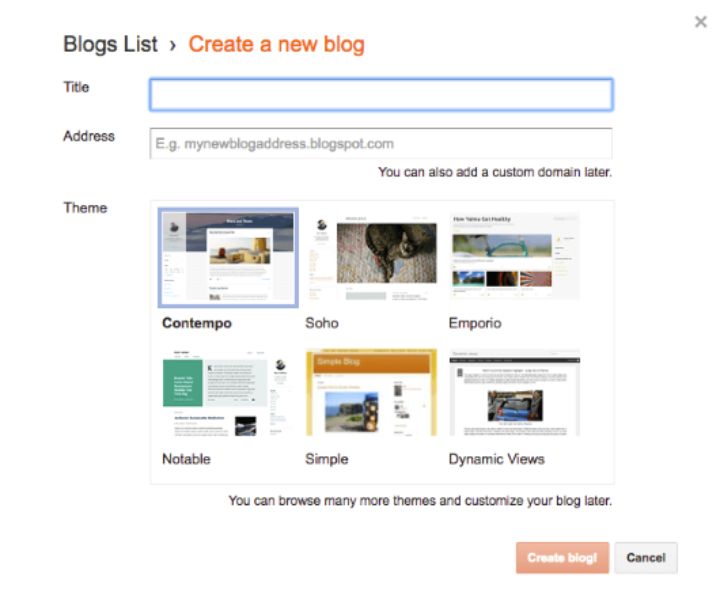
You can run a single blog or dozens of blogs. The interface is minimalist and largely self-explanatory. As I’ll touch on in the next section, Blogger is 100% focused on blogging (i.e., posting content in reverse chronological order with very little focus on other content types).
Blogger handles all the speed, security, and technical web hosting issues. It is SEO-friendly with a simple approach to design and functionality. The whole platform works.
In fact, there is a small movement of pure-play bloggers moving personal (i.e., non-commercial) blogs back to Blogger simply for the minimalist parameters.
As you can see from the images below, there’s very little jargon to learn or tricky steps to navigate to get started, though pointing a custom domain is a little tricky unless you are using a good domain registrar.
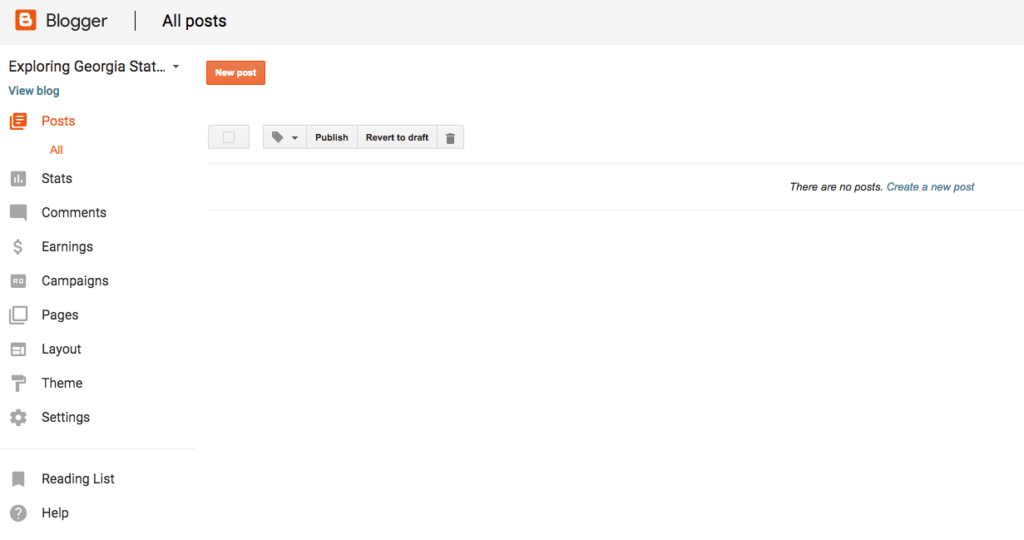
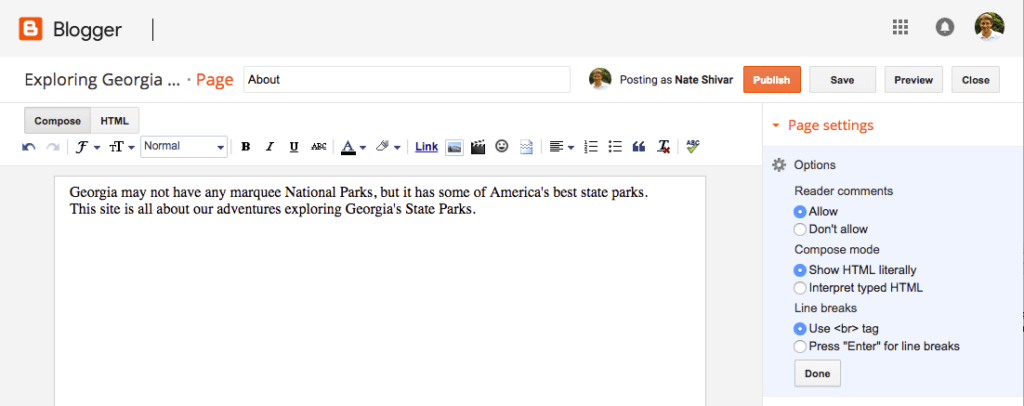
Overall, the simplicity points to the fact that Blogger is 100% focused on blogging.
Product Focus
There are a ton of publishing programs on the Internet that try to be everything to everyone…and end up being nothing to no one.
For worse, but mostly for better, Blogger has not chased the latest feature. It hasn’t tried to become a social network like Tumblr or Medium. It hasn’t tried to become a full website management system like WordPress. It hasn’t tried to become a “platform” of any kind. It hasn’t even moved to real-time data and messaging like Twitter.
Blogger has stuck to old-school blogging.
It still supports RSS. It defaults to comments. It focused on the latest posts. Blogger has focused on allowing anyone to quickly publish a full, rich piece of content to the Web for anyone to access.
This approach leads to some downsides, but there is something refreshing about using a product that knows what it is – and doesn’t try to become something that it’s not.
Google Integration
Google owns Blogger. And while Blogger is not Google’s marquee or sexiest product, Blogger is firmly within the whole “Google ecosystem.”
If you use any Google product, then you already have a Blogger account. And this integration makes the little things easier.
There’s no new username or password. Your data is always available for export thanks to Google Takeout, and you can buy a custom domain from Google Domains.
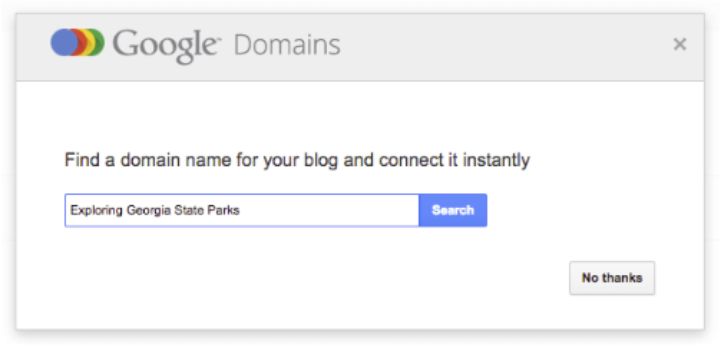
Google Photos stores your images. You can quickly monetize with the largest ad broker on the Internet (aka Google AdSense) or promote your blog via the largest search network.
You get the idea.
Speed & Performance
Blogger is a “hosted blog platform,” which means that it bundles hosting with the entire blogging service.
Google takes care of speed & security, so you don’t have to worry about it. Your focus can be 100% on content and promotion.
While there are plenty of reasons to set up your own hosting account, for many beginner bloggers, not having to learn about speed and security is a huge plus.
Cons of Blogger
While Blogger has a lot going for it, it has some key drawbacks, most of them relating to scalability. Blogger can (and does) host some of the highest-traffic blogs on the Internet, but it is also very limited.
Nearly every complaint you see on Blogger reviews has to do with the fact the person’s blog has outgrown Blogger in some way (i.e., in customization needs, support, etc.).
With that in mind, let’s look at some of the specific disadvantages of Blogger.
Customer Support
As with all Google products, Blogger doesn’t have much in the way of customer support. They have a forum where other users and an occasional Google staffer will answer questions.
Blogger is built to generate as few potential questions as possible, but as with any product, there will be issues. Unlike other website builders – or even WordPress web hosts – there’s no single support contact at Blogger.
Any issues that you might encounter have to be solved via Google search, DIY troubleshooting, and support forums.
Product Versatility
Blogger’s complete focus on blogging is a strength and a serious weakness. The product sticks to traditional blogging even now that many blogs have evolved into regularly updated websites that promote content via social feeds.
For example, most “blogs” nowadays have a homepage or landing page rather than a feed of posts in reverse-chronological order. And yet, without some awkward homepage redirects, there is no real way to have a “homepage” on Blogger.
Here’s the extent of the redirect manager:
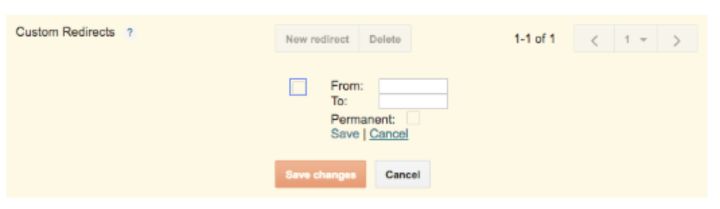
There is also no way to dictate the display order of your content or create different types of content (i.e., portfolio pages). You can’t radically change your website layout for different content or opt-in scripts.
Blogger is for blogging and nothing else. There are workarounds, but a lack of versatility is the main reason most bloggers leave Blogger and move to a self-hosted WordPress solution.
This point leads to a related but separate issue of design & customization.
Design & Customization
For a hosted blogging platform, Blogger allows for customization…but there’s usually a catch.
You can edit the HTML and CSS, but only if you can navigate the thousands of conditional statements in the Blogger code editor.
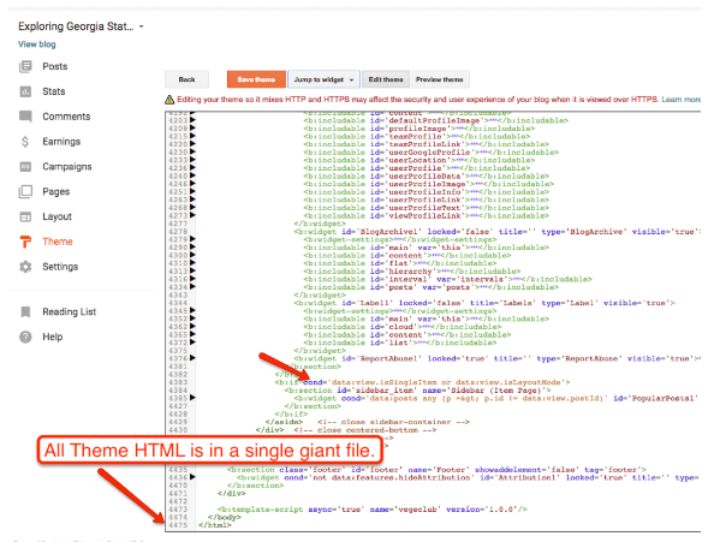
You can change your design layout with Blogger’s built-in elements.
You can customize individual elements of your theme and arrange elements…if they are available within Blogger’s theme editor.
And again, with content types, you have limited freedom to transform your content into something unique. You cannot add many 3rd party apps or integrations. And you can’t turn your blog into a fully managed website.
If you plan on starting and sticking with a traditional blog, this is a non-issue. But if you want to grow into a bigger website with interesting functionality, you are likely to hit a ceiling with Blogger.
On-going Investment & Features
Blogger’s platform is old. Google maintains it, but it has nowhere near the features of WordPress.com, Tumblr, or Medium and certainly not of a self-hosted WordPress powered site. Many other platforms allow for API calls, direct integration with social platforms, fancy Javascripts, and so much more.
Blogger is moving along, doing its thing as an old-school blogging service. That’s a good thing, but it can also be a bad thing if you want all the bells and whistles available to modern-day web publishers.
Google Promise / Content Policy
The last con of using Blogger as your blogging software is Google itself. Blogger has been a Google product for a long time. And Blogger, while not a large part of Google’s product portfolio, still serves Google’s core goal of bringing as many people as possible into its network of services. There is no immediate reason that it will go away.
But.
Google has also killed off plenty of established products with dedicated users. To name a few, Google has shut down:
- Google Reader
- iGoogle
- Google Apps for Teams
- Google Glass
Who can forget Google+ – their highest-profile side project ever?
Google has gone through countless changes with its local business product (aka Google Places, Google+ Local, Google MyBusiness, etc.). Google has started and ended more messaging apps than I can keep track of.
In other words, even though Blogger has a lot of benefits with Google, blogging is not and never will be Google’s priority.
Blogger will always be under threat of shutting down – even if it’s doing well.
If they did shut down – you wouldn’t lose your content but would have to transition your blog according to Google’s timeline – not yours. The bottom line is that there are more reliable options:
Most of all, your own website on your own hosting account.
The Google SEO Advantage / Disadvantage
There are people who say that Google is inherently untrustworthy and that you should never use their products because they just spy on you and are out to punish you.
Others believe that Google is the be-all and end-all when it comes to SEO and that you should use all of their products and do everything they say. Google will always prefer its own products and will reward everyone that uses them. It’s all about cooperating and sucking up to Google.
A third opinion is that you should use Google products that suit your business; don’t use Google products that don’t work for you. Either way, focus on testing and doing the right things for your customers.
I’m in the third camp. I have never seen any evidence that Blogger will “cleanse” or “un-blacklist” a website when it comes to search algorithms. I’ve never seen any evidence that blogs that live on Blogger get priority in the search results. I also have no idea why Google would even make that a factor.
Don’t buy into SEO snake oil when you are looking for a website builder. The only tested SEO truth is that the internet is made up of all kinds of websites, and you need to execute the fundamentals of content and promotion regardless of which platform you use.
The WordPress hosting or website builder you choose should be based on pricing, convenience, usability, and support.
Blogger Alternatives



Final Thoughts on Blogger
Blogger is a solid choice if you have a Google account and want to start a simple blog with minimal cost & fuss. Blogger is not good at providing new features, design options, new layouts, or creating a blog that makes money.
If you want to start a free blog with minimal fuss, you can start a blog on Blogger right now.
If you want to grow your website and have at least $100 to invest, take the time to setup WordPress on your own hosting account.
You can also get all the benefits of self-hosted WordPress and Blogger on WordPress.com (sign up free).
If you want all the benefits of Blogger but want to build a website (aka w/ a homepage and structured pages) rather than a blog, then go sign up for Wix (review).
Lastly, you can sort through various alternatives with my best website builder guide.